AI Song Cover
Drop a recording of a song you made, describe the version you want, and two new takes come back in that style with fresh AI vocals. Or swap the singer for a voice you trained.
Sign in and the cover is made in the Studio. The credit price sits on the Generate button, and a run that fails is refunded.
An AI song cover next to its original
Same song, same 30 seconds. Switch sides while it plays.
The prompt we typed:
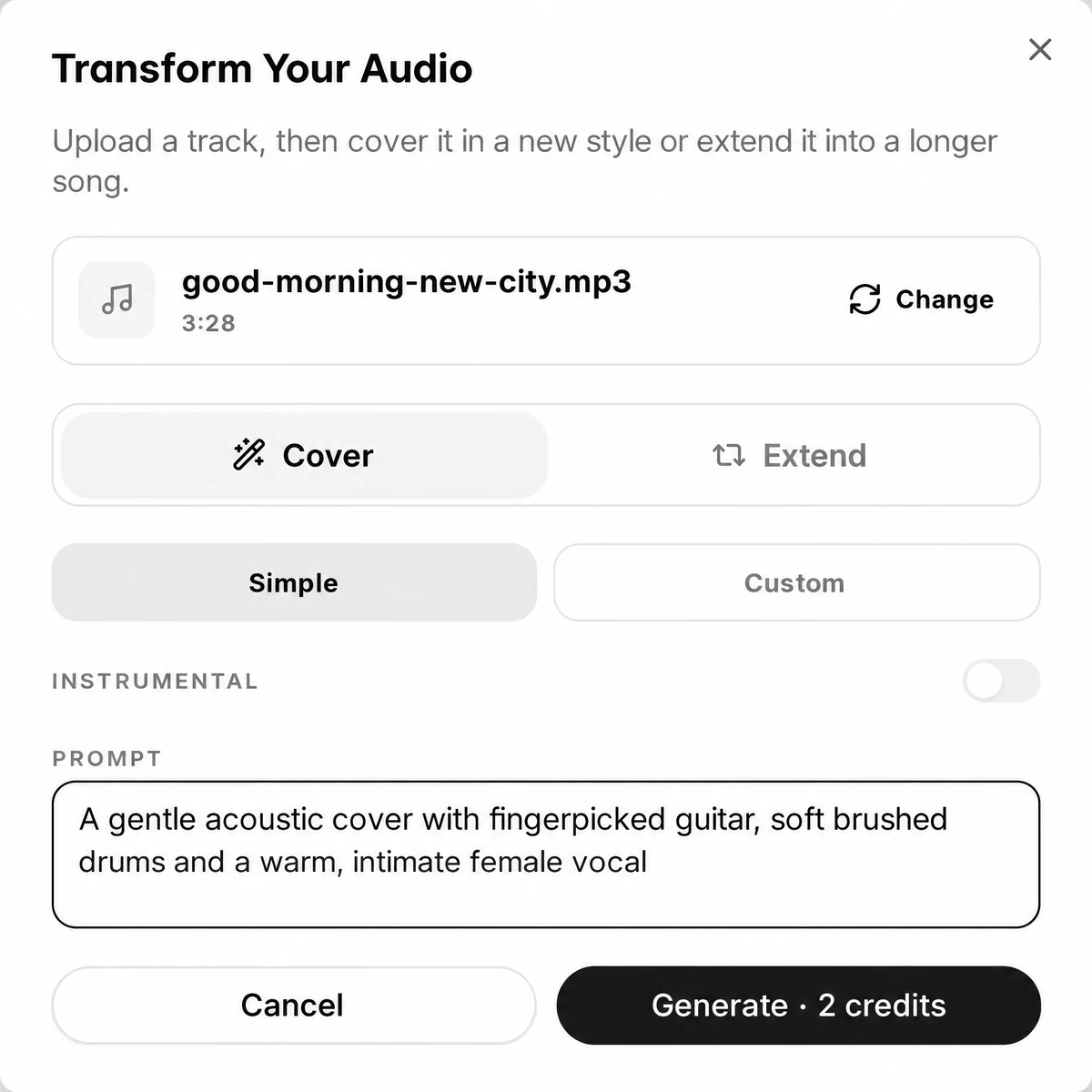
A gentle acoustic cover with fingerpicked guitar, soft brushed drums and a warm, intimate female vocal
Two ways to cover a song
Both live in the Studio's Cover and voice tab.
- Hear your song in another styleStyle coverDescribe the version in a prompt, or set a style line, title and lyrics in Custom mode. The whole song is performed again with new AI vocals.
- Keep the music, change the singerVoice swap coverPick a voice you trained under Select Voice. The singer is replaced; the AI vocal can move an octave down or up.
- Get a backing track in the new styleInstrumentalTurn on Instrumental in the style cover and the new version comes back without vocals.
A voice swap needs a voice first: train a singing voice on your own recordings once, and it waits under Select Voice. Want the song longer rather than restyled? An AI remix can also extend the track from a point you pick.
Making an AI song cover, screen by screen
Screens from the test run above, in the order you will see them.
1.Drop the song and describe the cover
Drop your file above and sign in. The Transform Your Audio dialog opens holding it, with Cover selected. In Simple mode, write the version you want in Prompt and press Generate; the button shows the cost.
2.Find two versions in your library
The cover runs in the background. Both versions arrive as new songs in your library, named for you, ready to play, rename or download.

3.Or swap the singer
In the Cover pane, add the song or click Select From Library, then Select Voice and pick a voice you trained. Set AI Key Shifting if needed and press Cover. The result is listed under Covered Songs.
Which songs you can cover
Made for songs that are yours
The style cover takes your own recordings and songs you made on SongDuet. Audio that matches a released recording from a streaming catalog is refused after you submit it, and the credits come back.
Our Terms of Service ask that you hold the rights to what you upload, and they forbid imitating a real singer, or passing a result off as a real artist, without permission. A voice swap therefore uses a voice you trained yourself.
Song cover maker specs
| Style cover input | A single track of 8 minutes or less, uploaded (MP3, WAV, FLAC, AAC, OGG) or picked from your library. |
|---|---|
| Your direction | Simple: one prompt. Custom: a style line, a title and optional lyrics. Instrumental on or off. |
| Style cover output | A pair of new songs each time, kept in your library, saved as MP3 or WAV. |
| Voice swap input | A song under 7 minutes and 30MB, plus a voice you trained. |
| Voice swap output | One cover in your library under Covered Songs, as MP3. |
| Key | Voice swap only: no shift, or the AI vocal one octave down or up. |
| Cost | A credit price per run, printed on the button; refunded when the job breaks. |
What a cover will not do
- No links. Pasting a YouTube, TikTok or Spotify address does nothing here; bring the audio as a file.
- No released hits. Recordings from streaming catalogs are refused by the style cover.
- Not your original vocal. A style cover sings it again with new AI vocals; a voice swap replaces the singer.
- Not note for note. The new performance follows the song, but melody, words and structure can drift.
- No stems. A cover comes back as one mixed track. Split it afterwards if you need parts.
- One song per run. No batches, and the key moves only by a whole octave.
Need parts from the finished cover? The vocal remover gives you the acapella and the instrumental, and the stem splitter breaks it into more rows. Before you share it, you can master the mix online too.
AI song cover questions
What does an AI song cover cost?
Each run uses credits, and the Generate button shows how many before you press it. If a run fails, or the song is refused, the credits come back.
Can I cover a hit song from Spotify?
Not with the style cover. Audio that matches a released recording from a streaming catalog is rejected and refunded. Use songs you wrote or recorded, or songs you made on SongDuet.
Can it sing in a famous artist's voice?
No. A voice swap uses a voice you trained from your own recordings. Our Terms of Service forbid imitating a real singer without that person's permission.
Can the cover be in my own voice?
Yes, after you train it once on the voice cloning page. Then pick it under Select Voice in the Cover pane and cover any song you can upload.
Will the words stay the same?
A style cover sings new AI vocals that follow your song, and words can drift. In Custom mode you can paste the lyrics you want sung.
How long does a cover take?
It runs in the background and lands in your library. In our test both versions were ready within a few minutes.
Can I paste a YouTube link?
No. Save your own audio as a file first, or pick a song that is already in your library.
MP3 or WAV?
A style cover can be saved either way; a voice swap result comes as MP3 only.