Song Maker
Type what the song is about and how it should sound. The SongDuet song maker writes the words, sings them and plays the band, then gives you two takes to choose from.
Writing your idea needs no account. Create song asks you to sign in, and each run uses credits.
A song maker for finished songs, not a beat toy
Plenty of music makers hand you a grid or a keyboard and wait for you to play. This one works from words.
What it is. An AI that turns a short description into a complete song: lyrics, vocals, melody and band, in two takes you can play, keep and download.
What it is not. A DAW, a piano roll, a step sequencer or an instrument you play by hand. Nothing here asks you to place notes.
- A drum loop you program by handA step sequencer where you click the hits yourself and export MIDI or WAV.Beat maker
- Your own lyrics firstGet verses and a chorus written, edit them, then paste them into the Studio song form.Lyrics generator
- A song for two voicesSwitch the console above from Simple to Duet and hand out the lines to Voice A, Voice B or both.Duet on this console
Want to click every kick and snare yourself? The beat maker lets you program a drum beat in your browser. Would you rather start from words? The lyrics generator drafts verses and a chorus you can edit first.
Hear what one sentence turned into
Both takes from one song maker run in our test, cut to the first verse and chorus. Nothing was edited after the run.
The description we typed
Warm acoustic folk song about the first snow in a small mountain town, gentle male voice, soft harmonica
SongDuet V6, Two takes, run on 19 November 2026. Both takes were ready 43 seconds after the takes page opened; the full songs run 3:03 and 3:00. One run, not an average.
First White, take A
Excerpt: verse 1 and chorus
First White, take B
Excerpt from the same point
The model named the song First White and wrote lines like “The first snow gathered on the courthouse steps” from that one sentence.
How to make a song with the song maker, step by step
These are the real screens, in the order you will see them.
1.Describe the song in one or two lines
Tell the song maker what the song is about and how it should feel: the story, the genre, the kind of voice, an instrument you want to hear. Anything from three characters up to a short paragraph works. More options opens the model picker and the Instrumental, no vocals box; leave them alone the first time. Not sure what the song should say yet? Our guide on how to write a song from first idea to demo starts with exactly that one sentence.
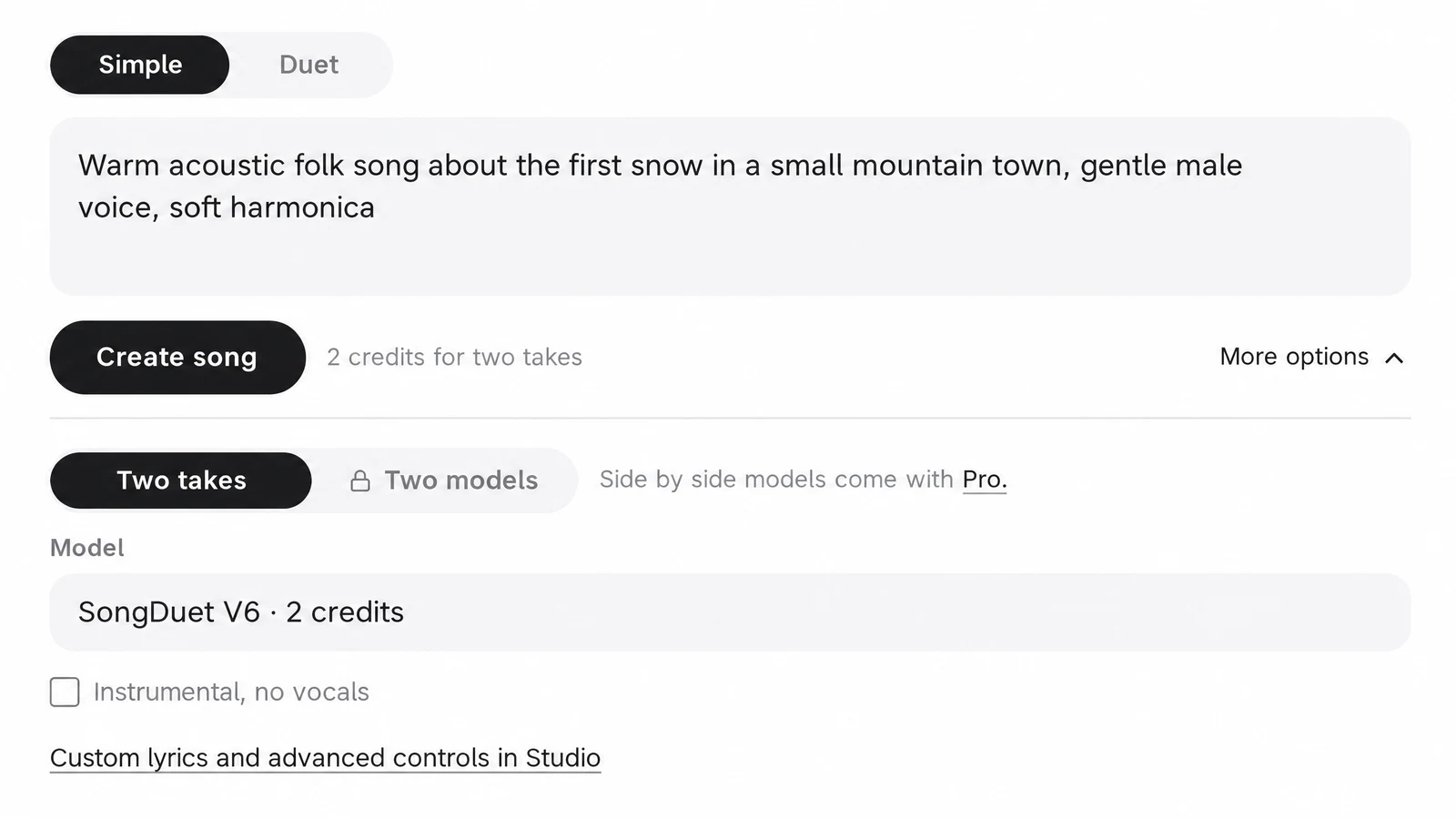
2.Press Create song
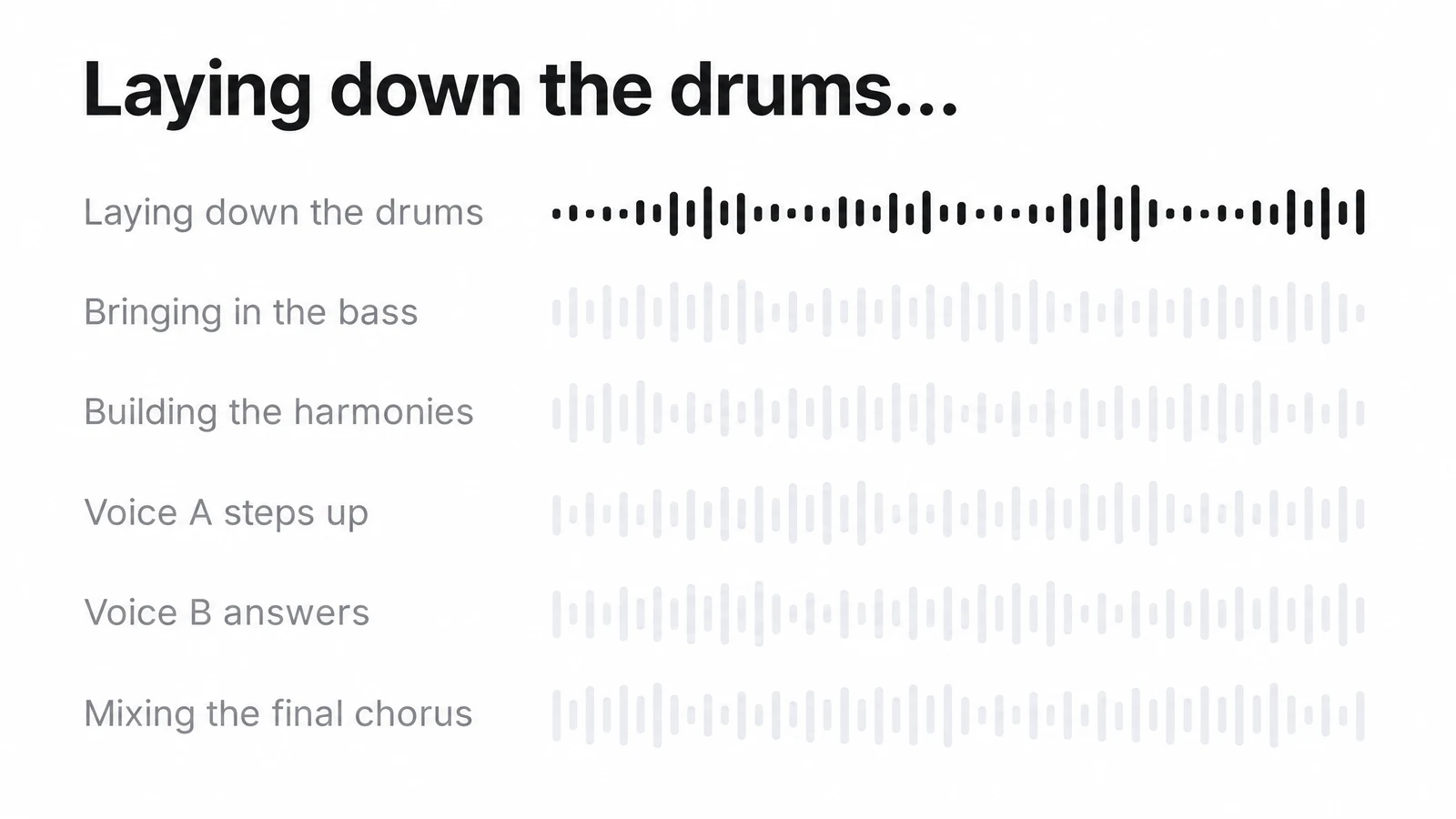
If you are not signed in, the sign in window opens first and your text stays in the box. Then the page moves to your takes and shows each stage as the band comes together. You can close the tab: the takes wait in My songs.
3.Compare the two takes
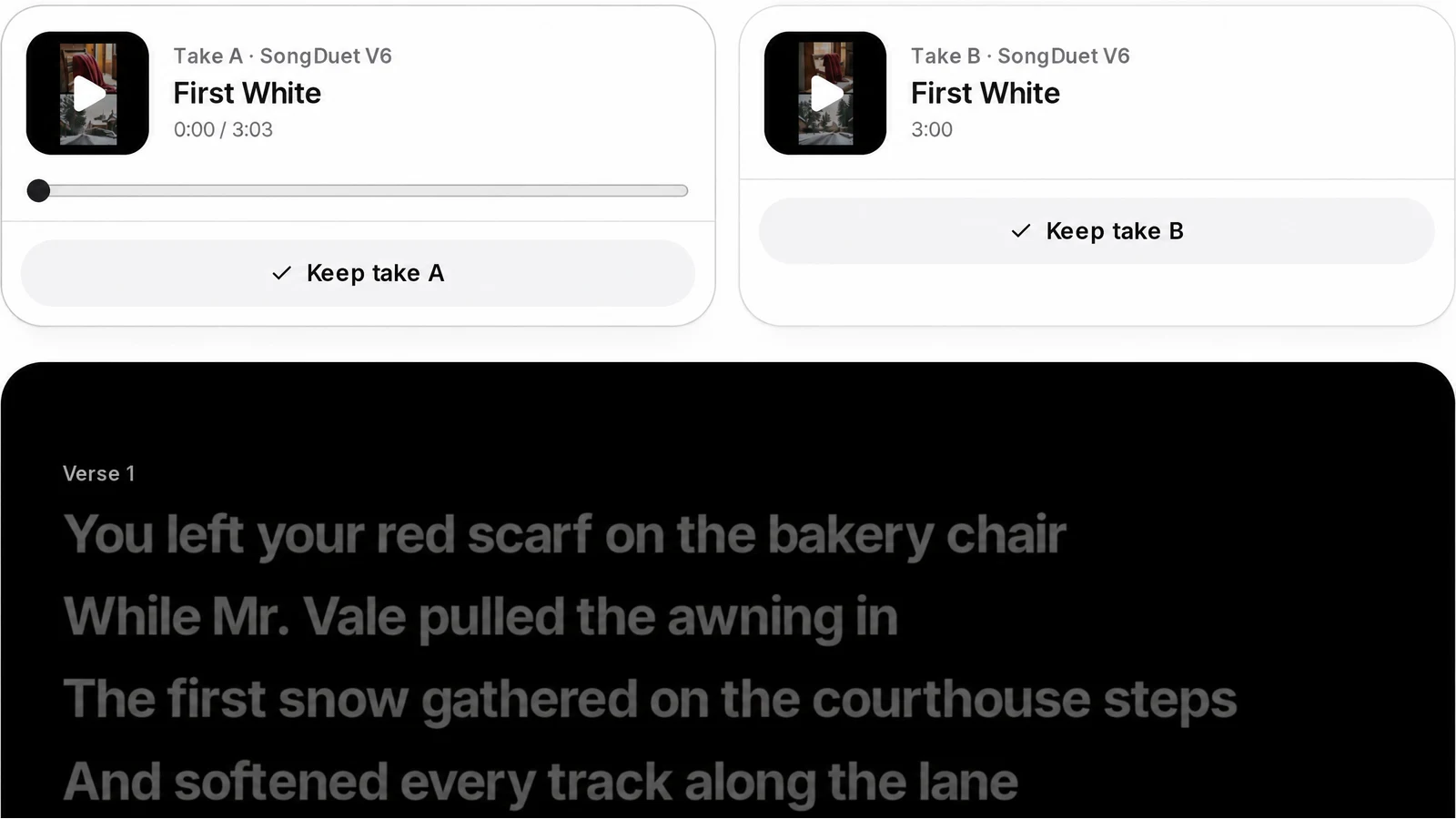
One run, two performances of your idea, each named and with artwork of its own. Hit space to listen; the arrow keys hop to the other take at the very same second, and the words light up line by line below. Keep whichever one you would play again.
4.Download it, share it, or keep working
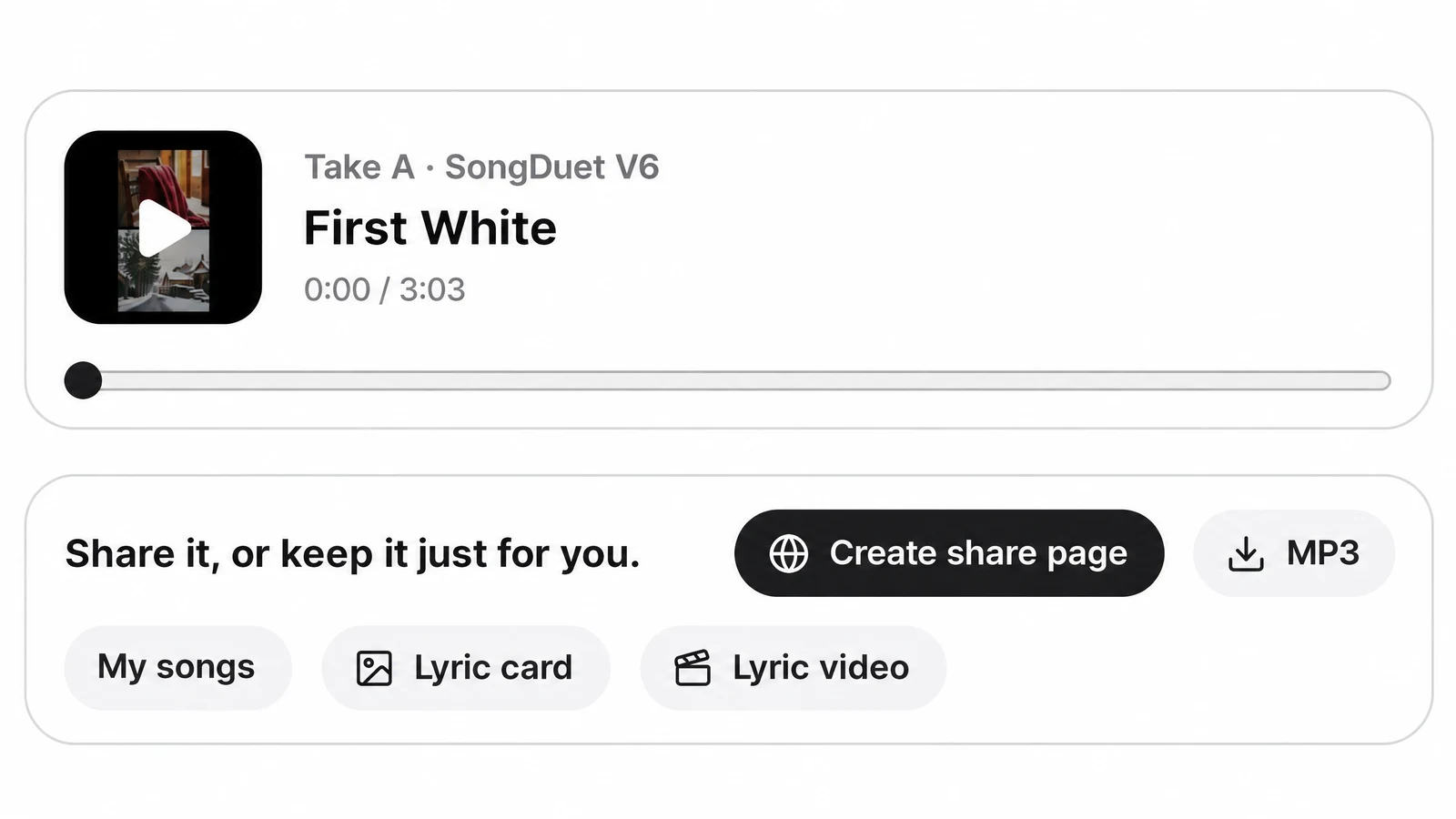
After you keep a take you get the MP3, a share page, a lyric card image and a lyric video. The song also sits in My songs in the Studio, where SongDuet V6 songs download as WAV too and you can go on with stems, extending or a new cover.
Song maker prompts that work well
Say what it is for, what it is about and how it should sound. Tempo, key and voice can go in the sentence too; the model treats them as hints, not hard settings.
| For | What to type |
|---|---|
| Music under a cooking clip | Vocals off. "Calm lo-fi piano with soft vinyl crackle for a cooking video, slow and steady" |
| Game or trailer soundtrack | Vocals off. "Tense orchestral build with taiko drums and low strings for a boss fight" |
| A birthday or thank you song | "Bright pop song for my sister Maya turning thirty, she loves road trips and bad karaoke, upbeat female voice" |
| A demo of your own idea | "Indie rock at about 120 BPM in A minor, driving bass, a shouted chorus about leaving a small town" |
| A podcast or stream intro | Vocals off. "Short punchy funk groove with slap bass and horns, confident and fun" |
What this music maker hands you: models, takes, files
What you get from one run, as the product works today.
| What you type | A song description of 3 to 500 characters. The model writes the lyrics, the title and the arrangement. |
|---|---|
| What comes back | Two takes of the song, each with its own title, cover image and player, and lyrics that scroll in time. |
| Models | The house models SongDuet V6, V6 Wild and V6 Mini, and partner engines like Google Lyria or Mureka whenever they are turned on. A price sits next to every name in the picker. |
| Take A and take B from different models | With Pro, take A can come from one model and take B from another, names hidden until you choose if you like. |
| Vocals | Sung by default. Tick Instrumental, no vocals for a track without voice. |
| Files | MP3 from the takes page. SongDuet V6 songs also download as WAV from My songs; partner model songs have no WAV. |
| Your own lyrics | Use the Studio song form in Custom mode: title, style of music and lyrics up to 5000 characters. |
| Where songs are kept | My songs in the Studio library. Songs stay private until you create a share page. |
Still weighing your options? We put AI music generators compared side by side: what each one makes, what its free plan gives, downloads and commercial use.
Account, credits and where it stops
The honest list before you sign in.
- Signing in and paying in credits. Typing is open to anyone; the song itself is made for a signed in account and paid in credits at the moment the run begins. If the run breaks, the credits come back by themselves. A take that simply is not to your taste is still a finished run.
- Not an instrument or a DAW. There is no piano roll, no step grid and no recording on this page. You describe the song and the AI makes it.
- Tempo, key and voice are hints. Write them into the description and the model usually follows them, but they are not hard settings.
- No length setting. The model decides how long the song is; there is no length control in Simple mode.
- Not your voice, not a famous voice. It does not sing in your own voice and does not imitate a named artist or copy a released song.
- No MIDI, stems or sheet music here. Those are separate Studio tools you can run on the finished song.
Song maker questions
What does the song maker cost?
You can write and change your idea without an account. Making the song needs a signed in account and credits; each model shows its price before you start, and a run that fails is refunded.
Do I need to know music to use the song maker?
No. One sentence about the subject and the sound is enough. The AI writes the lyrics, picks the chords and arranges the band. If you do know what you want, add the genre, tempo, key or instruments to the sentence.
Can I make a song with my own lyrics?
Yes. That lives in the Studio: switch the song form to Custom, fill in Title and Style of Music, and put your words in Lyrics. No words yet? Let the lyrics generator draft some, then edit them there.
How fast is a song ready?
The takes page says most songs are ready in about a minute. In our own test on 19 November 2026, one run on SongDuet V6 returned both takes in 43 seconds.
Can I make music without vocals?
Yes. Open More options and tick Instrumental, no vocals. That is the setting for background music, intros and game tracks.
I wanted a music maker where I play the notes myself.
This page is not that kind of tool. For drums you program by hand, use the beat maker; for anything with tracks, a piano roll and recording, a desktop DAW is the right tool.