Mashup Maker
Start with the track whose singer you want. The mashup maker in the Studio takes it from here: add a second track for the backing, let Auto match pull the voice onto that tempo and key, nudge by ear, and save the result.
Use the mashup maker, step by step
Shot on our own Studio with two songs made on SongDuet: good-morning-new-city as the vocal, lisbon-rain as the beat.
1.Drop the vocal song here
Use the box at the top of this page for the song whose singer you want to keep. SongDuet opens the mashup maker, the Mashup tab in the Studio, and asks you to sign in if you are not already. Your file waits in the browser for 15 minutes while you do.
2.Add the song with the beat
Your song sits under Vocal from. Drop the second song on Beat from, or pick one with Library. Each song shows its BPM, key and length as soon as the browser has read it. Leave Splice selected.
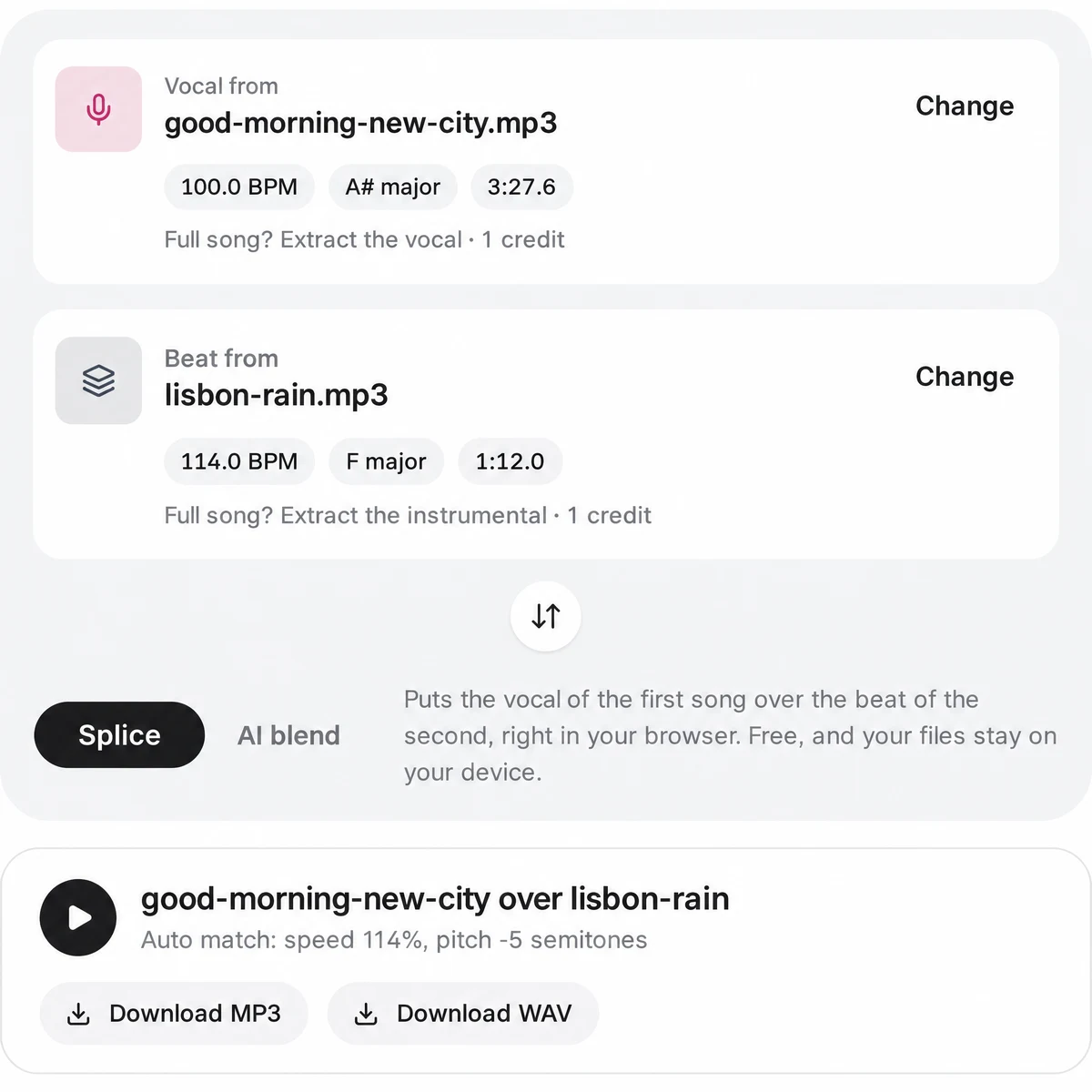
3.Check the Auto match line and nudge the voice
In our November 2026 run the vocal song read 100 BPM in A# major and the beat 114 BPM in F major, so Auto match set the vocal to speed 114% and pitch -5 semitones. Press play and move Vocal start until the first line lands on the beat; the +1 beat and +¼ beat buttons step it in time with the groove. Set the two volumes last.
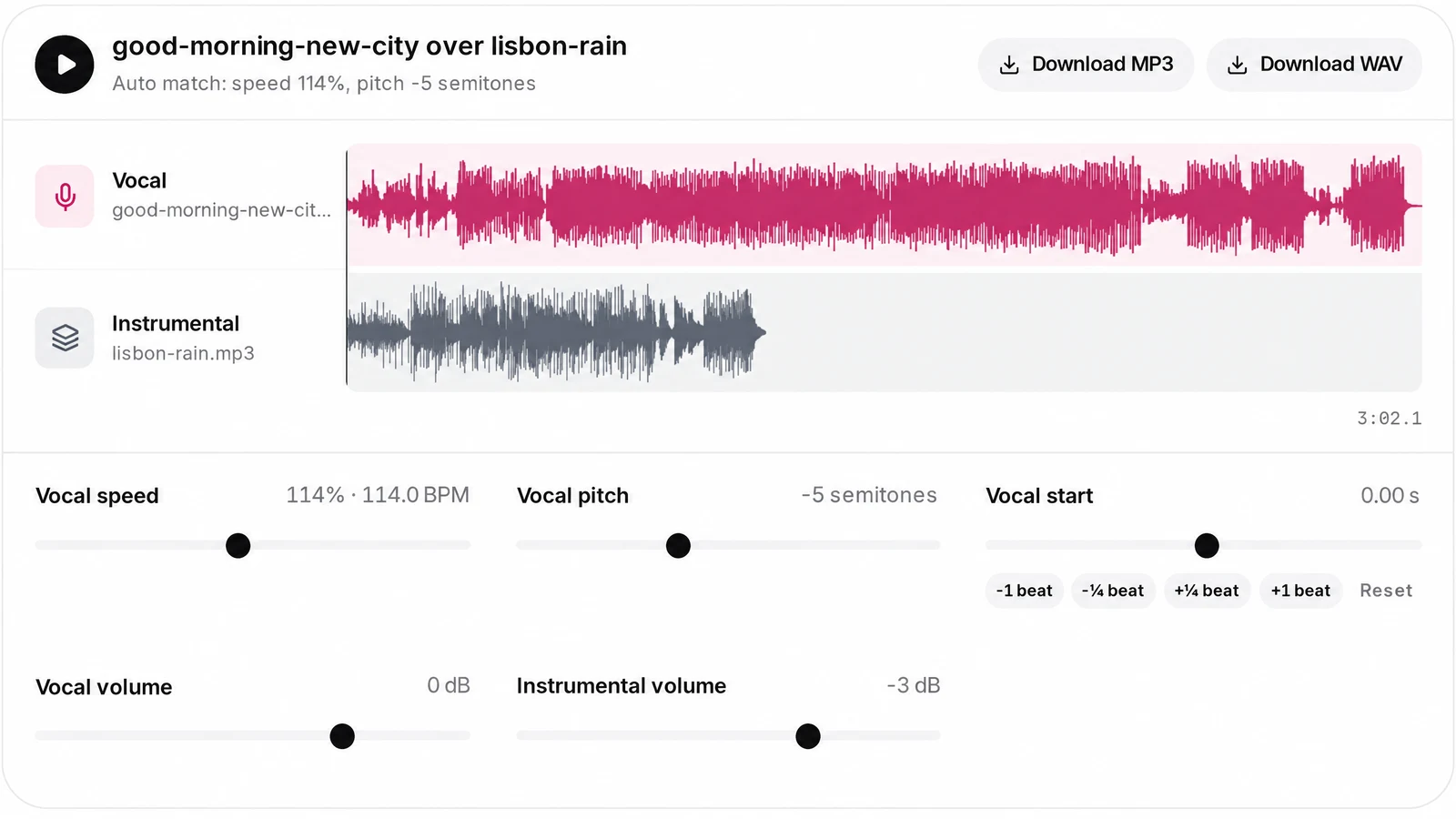
4.Download MP3 or WAV
Download MP3 or Download WAV mixes the two lanes in your browser with every setting you chose. The file is named after both songs, for example good-morning-new-city-x-lisbon-rain-mashup.
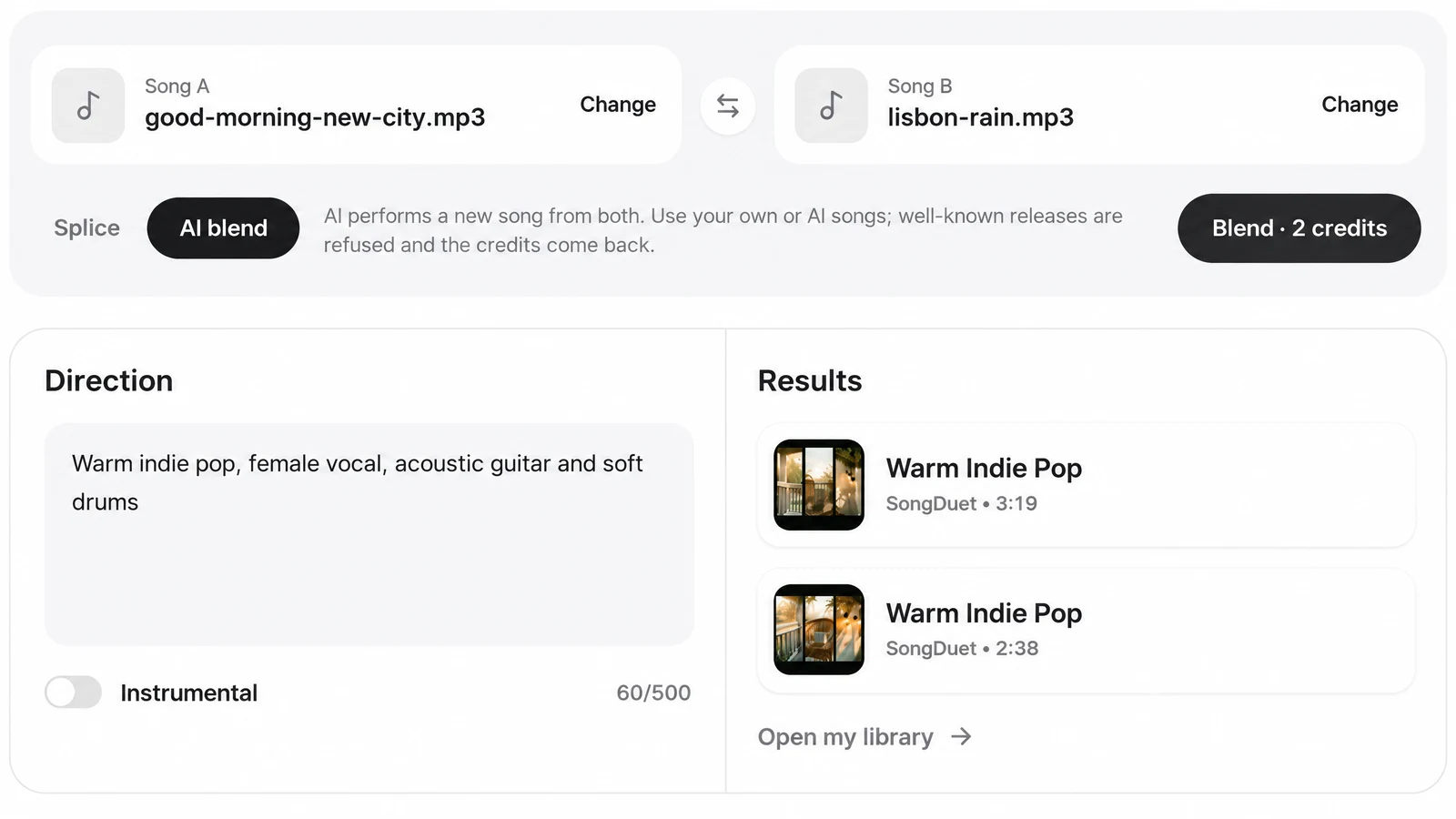
5.Or switch to AI blend for a new song
Flip the method to AI blend, describe where it should go (our run used Warm indie pop, female vocal, acoustic guitar and soft drums) and press Blend, which lists its price in credits. The run comes back with two versions under Results, ready to play and also kept in your library.
Song mashup maker modes: splice or AI blend
Both live on the same Mashup tab and share the two songs, so you can try one and then the other.
- You want the real singer over the real beat, like a DJ editSpliceYour two recordings, stretched and shifted in the browser. Nothing is uploaded and no credits are charged.
- You have two full songs and want only the voice of oneSplice with ExtractThe Extract link under that slot hands it to our separation server, and a few minutes later only the singer (or only the band) is left there. This step is paid in credits.
- You want a fresh song that borrows from bothAI blendAI performs a new song from the two, steered by your direction, with an Instrumental switch. Best with your own or AI made songs.
Want both halves of one song as files of their own? The vocal remover returns the acapella and the instrumental as separate downloads. Working with a single song? An AI remix restyles one track in a new genre from a short prompt instead.
What Auto match sets, and how far you can move it
These ranges are built into the Splice tool. Every slider plays live, so you hear the change while the mashup runs.
| Tempo and key | Read from each song in the browser and shown under it, with its length |
|---|---|
| Auto match | Sets the vocal to the beat’s tempo, trying half and double time, and shifts it to the beat’s key; a minor key is compared through its relative major |
| Vocal speed | Anywhere from half to double, from 50% to 200%, while the pitch holds still |
| Vocal pitch | Up to 12 semitones down or up, without changing speed |
| Vocal start | Up to 60 seconds earlier or later, with -1 beat, -¼ beat, +¼ beat and +1 beat nudges |
| Volumes | Vocal and Instrumental, each from -24 dB to +6 dB; the instrumental starts at -3 dB |
| Download | MP3 at 192 kbps or WAV, mixed in your browser |
Why it picks the shortest move
Beat trackers often hear a song at half or double its real speed. Auto match tries those too and keeps the speed change closest to the original, so the voice is stretched as little as possible. The pitch shift works the same way: it takes the shorter way round, never more than half an octave.
On a song without a clear beat the detector can miss, and speed then stays at the original. Trust your ears over the numbers; Use auto match puts the detected values back.
What the mashup maker costs per run
The mashup maker is part of the SongDuet Studio, so you need an account. Splice itself charges no credits: both songs are read, matched, played and mixed on your own device.
Two things use credits. Extract the vocal or the instrumental runs a separation on our server, and AI blend performs a new song. Each button shows its cost before you press it, and if a run fails or a blend is refused, the credits come back.
A fresh SongDuet account comes with welcome credits to try the paid steps.
Before you share it
What the mashup maker does not do, so you can plan around it.
- Two songs only. One vocal and one beat per mashup. A third song means downloading the result and starting a new mashup with it.
- One offset, no arranging. You can move the vocal earlier or later, but not cut, loop or rearrange sections.
- No DJ effects. There are no crossfades, EQ, filters or transitions. Finish those in a DAW or DJ software.
- Files, not links. Streaming and video links are not accepted, only audio files and library songs.
- Download it to keep it. A Splice mix is not saved to your library. Download it before you leave the tab. AI blend results do stay in the library.
- Rights are yours to check. SongDuet does not clear rights for the songs you combine. Only post a mashup of songs you are allowed to use.
An AI blend result sits in your library, so you can master the mix in one click before you post it. To hear the finished mashup sung by someone else, an AI cover maker can swap the singer for a voice you trained.
Mashup maker questions
Which audio formats go in the two slots?
MP3, WAV, FLAC, M4A, AAC or OGG, each under 100MB. Songs already in your SongDuet library can go in either slot too.
Can I paste a YouTube or Spotify link?
No. The mashup maker takes audio files and library songs only. Save the audio to your device first, then drop it in.
Both of my songs are full mixes. Will it still work?
Splice plays the whole of each slot, so two full mixes give you both bands at once. Press Full song? Extract the vocal under the first song, or Extract the instrumental under the second, and the separated part takes that slot after a few minutes. The link shows the credit cost before you press it.
What if the detected tempo or key is wrong?
Songs without a clear beat can fool the detector. Move Vocal speed and Vocal pitch by ear; Use auto match brings the detected values back.
Can I put the second song’s vocal on top instead?
Yes. The round button between the two songs swaps them, so the other vocal goes over the other beat, without loading anything again.
How long does an AI blend take?
Usually a few minutes, and the panel shows progress while it runs. Each run gives two versions, which also land in your library.
Why was my AI blend refused?
AI blend turns down well-known released recordings, and the credits for that run come back automatically. Use Splice for those, or blend songs you made yourself.
Is there a mashup app to download?
No app. The mashup tab runs in a web browser after you sign in to SongDuet.