Beat Maker
A free beat maker with a step sequencer that runs in your browser. A groove is already loaded, so press Play, click the grid to make it yours, then download MIDI or WAV. No download, no sign up.
Making, sharing and downloading need no account. Sign in to save beats to My beats.
Pattern
Click a step to add a hit, drag to paint, Shift-click for a ghost note. Click a row name to change its sound.
Sound for Kick
Dusty kit synthClick a sound to use it on this row; your hits stay where they are. The play button only previews.
Every sound here is public domain or CC0, free to use in your releases. Sampled from classic drum machines and the Meadowlark library.
Use the beat maker, from first click to export
This is the real order on the page. The beat maker plays the moment you press Play, with nothing to wait for.
1.Pick a groove and press Play
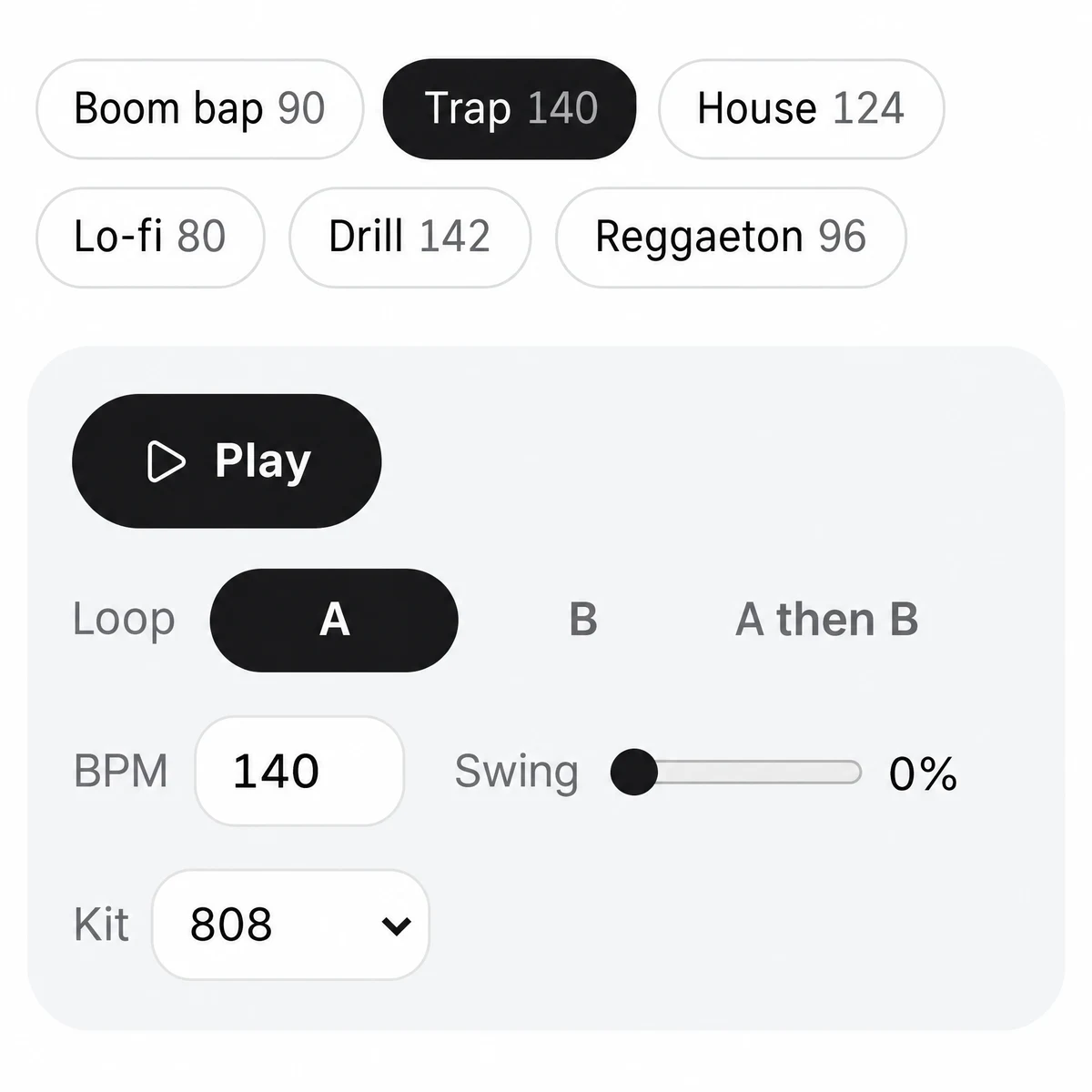
Above the Play button sit eight grooves: Boom bap 90, Trap 140, House 124, Lo-fi 80, Drill 142, 80s 112, Vintage 104 and Reggaeton 96. Tap one and it sets the BPM, Swing, Kit and a full pattern. Press Play, or the Space bar, and the loop starts right away. There is nothing to load and no account to make. This is the phone layout: the same controls work on a small screen.
2.Click the grid to change the beat
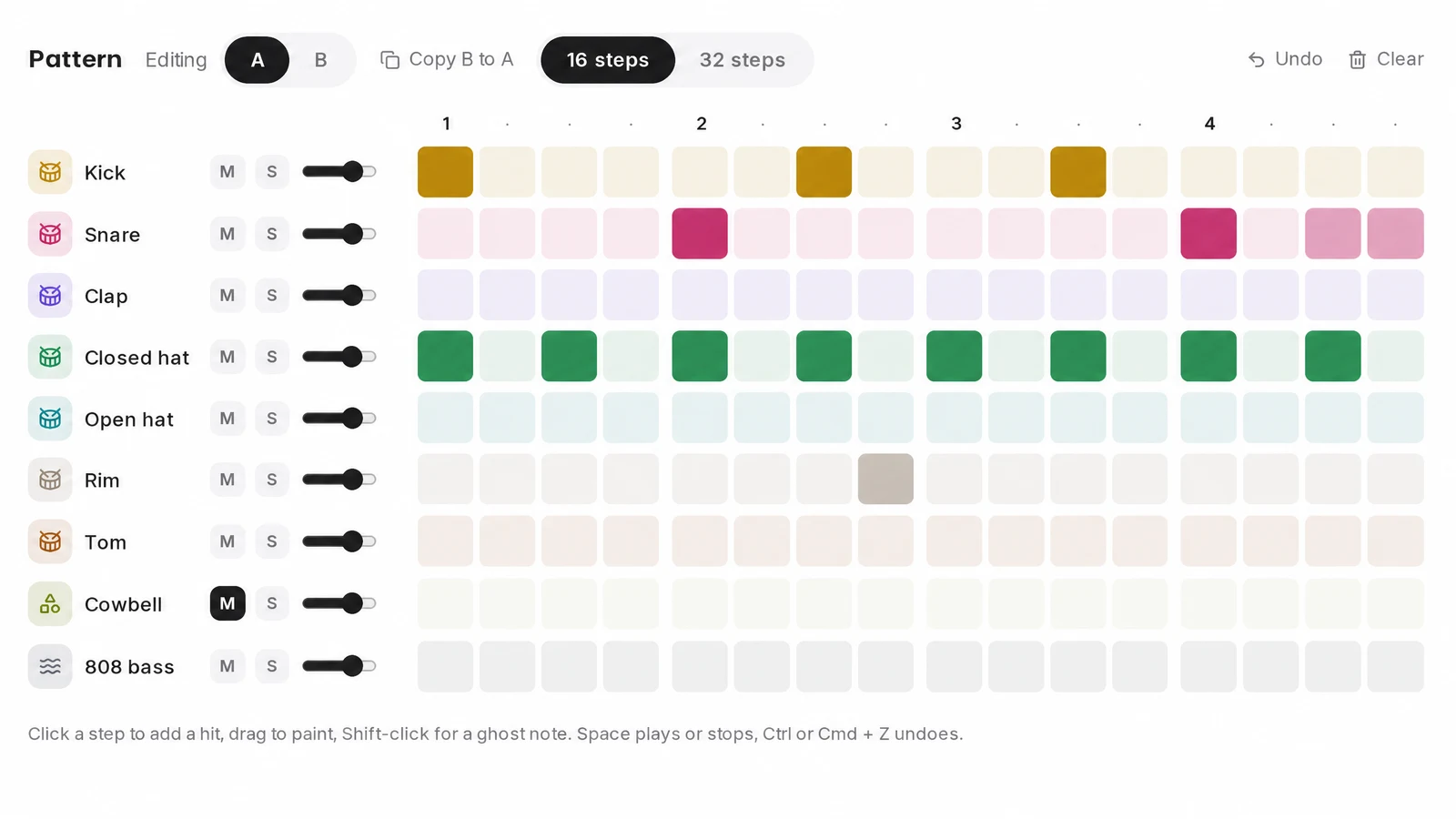
Click a step to add a hit. Click and drag along a row to paint several at once. Shift-click puts in a ghost note, a softer hit at about half volume. Each row has M to mute it, S to solo it and a volume slider. You hear every change while the beat keeps looping, and Undo steps back if a change does not work. A whole drag counts as one undo step.
3.Give a row a new sound
Click a row name, say Snare, and the sound picker under the grid opens on the snare sounds. The play button next to each sound previews it. Click the sound itself and the row uses it from the next hit, with every hit left where it was. There are 79 drum samples, recorded from LM-2, CR-78, MRK-2 and TR-505 drum machines plus a set of Kickmess kicks, all public domain or CC0. Kit synth puts the row back on the kit’s own sound.
4.Write pattern B and loop A then B
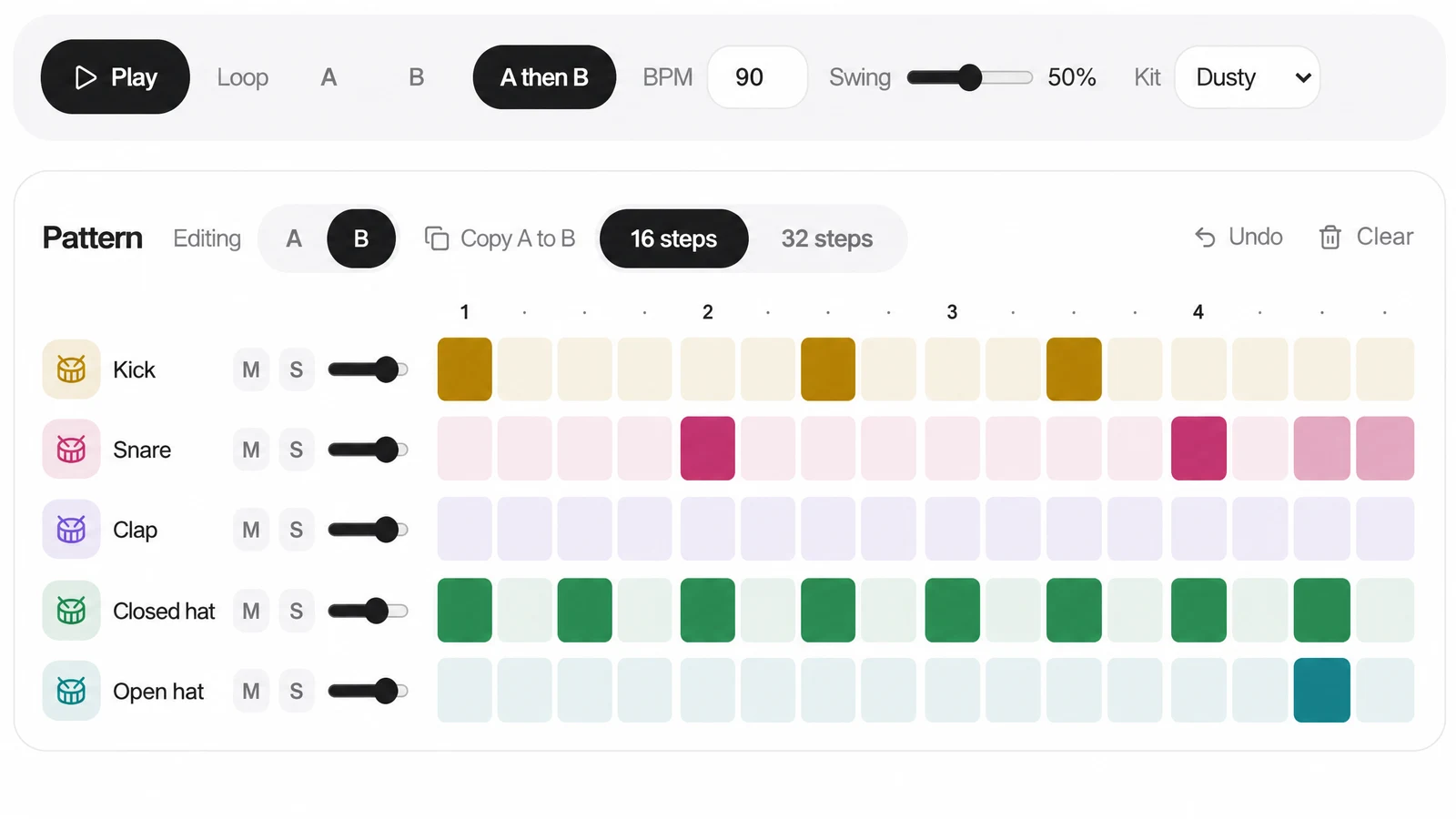
Set Editing to B and press Copy A to B, so B starts as a copy of your loop. Change the end of the bar, say an open hat or a snare roll. Then set Loop to A then B and the two bars play as one phrase. If you edit one pattern while the other is playing, the card says Now playing B (or A) so you always know which one you hear.
5.Download MIDI or WAV, or copy the link
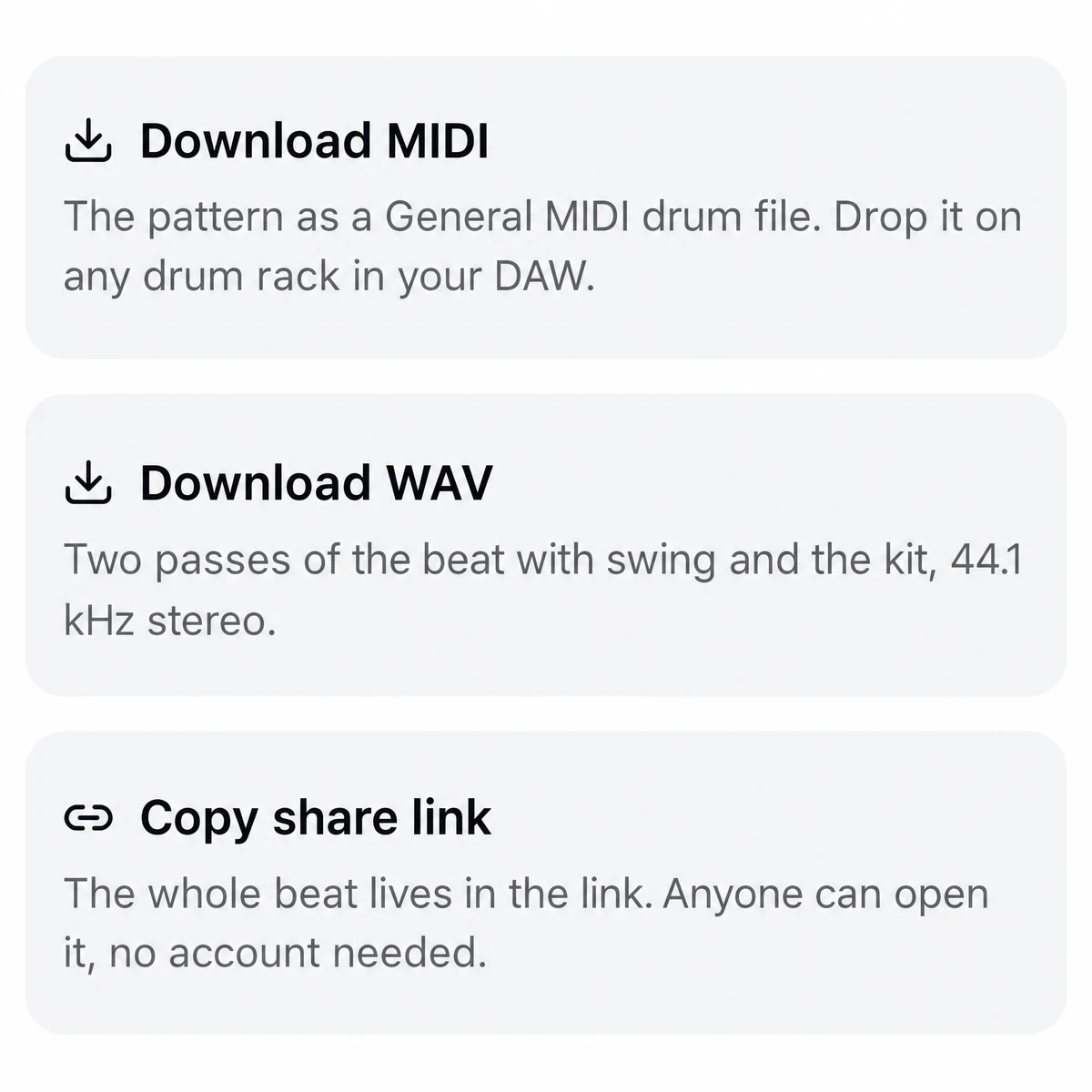
Under the grid are three buttons. Download MIDI saves the beat as a General MIDI drum file. Download WAV renders two passes of the beat in your browser, with your swing, kit and sounds. Copy share link puts the whole beat into a web address that anyone can open. With a free account, Save keeps the beat in My beats under a name you choose.
6.Finish the track in your DAW
Drag the MIDI file onto a drum instrument or drum rack. The kick sits on note 36 and the snare on 38, and the other rows follow the General MIDI drum map in the table below, so a kit laid out that way plays the beat as you wrote it. The 808 bass comes in on its own channel for a bass instrument. If you would rather work with audio, put the WAV on an audio track.
Free beat maker presets: eight grooves and four kits
A groove sets the tempo, swing, kit and pattern A. The five marked below also write a pattern B that ends in a fill, and 80s and Vintage put drum machine samples on their rows.
| Groove | BPM | Pattern B |
|---|---|---|
| Boom bap | 90 | Yes, ends in a fill |
| Trap | 140 | Yes, ends in a fill |
| House | 124 | Yes, ends in a fill |
| Lo-fi | 80 | Starts empty: Copy A to B |
| Drill | 142 | Starts empty: Copy A to B |
| 80s | 112 | Yes, ends in a fill |
| Vintage | 104 | Yes, ends in a fill |
| Reggaeton | 96 | Starts empty: Copy A to B |
Kits
- 808
- Long tails on the sounds.
- Club
- A brighter take on the same rows.
- Dusty
- Low-passed, with the top end rolled off.
- Punchy
- A sharper attack on the kick.
Any kit works with any groove, and the change is heard without stopping. Styles outside these eight start from a blank grid. Starting from nothing? Our beat making guide builds one from the first kick.
Two patterns turn a loop into a phrase
One bar on repeat gets old fast. Pattern B is the answer bar: a fill, a dropout, a new hat.
Loop has three settings. A plays pattern A on repeat, B plays pattern B, and A then B plays them back to back as a two bar phrase. Copy A to B (or B to A) starts a variation from the other pattern, so you only change what should change.
Both patterns share one length, 16 or 32 steps. When Loop is set to A then B, the MIDI and WAV downloads both hold A followed by B, so the phrase lands in your DAW exactly as it played on the page.
If your fills keep landing early or late, practice them against a click with accents at the same BPM first, then come back and program them here.
What goes into the MIDI and WAV files
The numbers a producer needs before dragging a file into a session.
| Row | Note | Channel |
|---|---|---|
| Kick | 36 | 10 |
| Rim | 37 | 10 |
| Snare | 38 | 10 |
| Clap | 39 | 10 |
| Closed hat | 42 | 10 |
| Tom | 45 | 10 |
| Open hat | 46 | 10 |
| Cowbell | 56 | 10 |
| 808 bass | 31 (G1) | 1 |
| Rows | Nine: kick, snare, clap, closed hat, open hat, rim, tom, cowbell, 808 bass |
|---|---|
| Pattern length | 16 or 32 steps of 16th notes, the same for A and B |
| Tempo | 60 to 240 BPM |
| Swing | 0 to 100 percent on screen; at the top it pushes every second 16th note late by 30 percent of a step |
| Each step | Empty, a hit, or a ghost note at about half volume |
| Kits | Four: 808, Club, Dusty, Punchy |
| Sound | Per row: the kit’s sound, synthesized in your browser with Web Audio, or one of 79 drum samples; nothing is uploaded |
| Samples | 23 kicks, 7 snares, 2 claps, 6 closed hats, 4 open hats, 4 rims, 8 toms, 19 percussion, 6 cymbals; public domain or CC0 |
| WAV file | 44.1 kHz, 16 bit, stereo; two passes of the beat with swing and the kit |
| MIDI file | General MIDI drums on channel 10, the 808 bass on channel 1; ghost notes get a lower velocity; muted rows are left out |
| A then B | Both files hold pattern A followed by pattern B |
| Where the beat is kept | In the share link, which holds both patterns, tempo, swing, kit, loop, and each row’s sound, volume, pan, mute and solo; or in My beats with a free account |
Where this beat maker stops
What the beat maker cannot do, better known now than halfway through a beat.
- No uploading your own samples
- The nine rows are fixed. Each can use the kit sound or one of the 79 built-in samples, but you cannot load your own sounds or drum kits.
- The 808 bass plays one note
- There is no pitch, length or slide per step, so 808 melodies have to be written in your DAW after the MIDI export.
- Saving needs an account
- Making, sharing and downloading need none, but My beats does. Without one, Copy share link is how you keep a beat.
- Ghost notes need a keyboard
- A ghost note is a Shift-click, so on a touch screen every tap is a full hit.
- Eight grooves to start from
- Other styles, such as phonk, jersey club or afrobeats, start from a blank grid and the closest tempo.
- Drums only, no melody
- There are no chords, no piano roll and no audio file per row in the export. You cannot record from a MIDI controller or pads either.
Need chords, a melody and vocals on top of the drums? With an account you can make a full song from one sentence. Or see how other free beat maker sites handle samples and melody.
Beat maker questions
Is this beat maker free?
Yes. Editing, playback, the MIDI and WAV downloads and the share link cost nothing and need no account.
Do I have to download an app?
No. The beat maker runs in your web browser. Kit sounds are synthesized on your device with Web Audio, the drum samples load as small files when a row uses them, and nothing you make is uploaded.
Can I make beats on my phone or a Chromebook?
It runs in the browser, so there is nothing to install. On a phone each row wraps into lines of 8 steps, so a full bar fits without scrolling sideways. Ghost notes need Shift-click, so on a touch screen every tap is a full hit.
How do I save a beat and come back to it?
Two ways. With a free account, press Save and the beat goes into My beats, where you can open or delete it later. Without an account, press Copy share link and hold on to that address: both patterns, the tempo, swing, kit and sounds live inside it, and opening it puts the beat back on the grid.
Which notes does the exported MIDI use?
The MIDI file uses the General MIDI drum map on channel 10, with kick on 36 and snare on 38, and the 808 bass on channel 1. Drop it on a drum rack or drum instrument. If you want audio instead, the WAV is 44.1 kHz, 16 bit stereo.
Can I make trap or drill beats with hard 808s?
Start from Trap 140 or Drill 142 and pick the 808 kit, the one with long tails. The 808 bass row plays one note, with no slides or pitch changes per step.
What does swing do?
It pushes every second 16th note a little late, for a looser feel. At the top of the slider the delay is 30 percent of a step. You hear the change while the beat plays.
Can I add melody, chords or my own samples?
Not on this page. It covers drums and an 808 bass on one note. Each row can use one of the 79 built-in drum samples, but you cannot upload your own.
Can I use the drum samples in my own releases?
Yes. Every sample in the sound picker is public domain or CC0, so you can use beats made with them in your music without credit or fees.