Audio Mastering Software
Eight audio mastering software picks, from a full mastering editor to an upload in the browser. Each one gets its type, platform, price model and reference features, taken from its own site in November 2026.
Which audio mastering software fits your goal
One goal per line and one pick for it. SongDuet appears once, for the case it is built for.
- Edit, sequence and deliver a whole record, with detailed meteringWaveLab ProA mastering application for Windows and macOS with an Audio Editor, the multitrack Audio Montage, a batch processor and an EBU R128 loudness meter.
- An assistant that builds a mastering chain inside your DAWiZotope OzoneA mastering plugin suite (AAX, AU, VST3). Master Assistant builds a chain in seconds and can match the tonal balance, width and impact of a reference file.
- A final limiter you set by ear, with loudness and true peak metersFabFilter Pro-L 2A limiter plugin with true peak metering and loudness metering to EBU R128, ITU-R BS.1770-4 and ATSC A/85. A 30 day trial is offered.
- You already mix in Logic on a MacLogic Pro Mastering AssistantBuilt into Logic Pro: it listens to the track and adjusts dynamics and frequencies, and you can change the result. Logic Pro is paid, with a trial for new subscribers.
- Online AI mastering with several styles and MP3 or WAV filesLANDRUpload in the browser, preview styles and loudness for free, and pay per track or by subscription to download. A reference track option and a DAW plugin are offered too.
- Online AI mastering from a service built by mastering engineerseMasteredAn online engine that its site says was made by Grammy winning engineers, with a Reference feature that aligns your master with a song you upload.
- Try online mastering with presets before spending anythingBandLab MasteringFree mastering with four presets on the web and in the app. A paid Membership adds the other presets, input gain and intensity controls, and, its page says, as many masters as you want.
- No DAW, a finished stereo mix, and a song you want it to sound likeSongDuet AI masteringMatch a Reference matches loudness, EQ, peak level and stereo width to that song; One-Click Master needs no reference. Runs in the Studio after sign in, costs credits, and downloads a WAV.
Audio mastering software side by side
Facts as each product's own site states them. Where a site did not say something, the table says so.
Audio mastering software by type, platform, price model and reference features. Each fact checked in November 2026 on the site named in the Source column.
WaveLab Pro
- Type
- Mastering editor
- Platform
- Windows, macOS
- Price model
- Paid (Pro and Elements editions); free trial offered, length not stated on the page we read
- Reference or assistant
- Audio Montage, batch processor, EBU R128 loudness meter; reference matching not stated
- Source
- Steinberg site
iZotope Ozone
- Type
- Mastering plugin suite (AAX, AU, VST3)
- Platform
- Windows, macOS
- Price model
- Paid (Elements, Standard, Advanced); 10 day trial with full functionality
- Reference or assistant
- Master Assistant; matches tonal balance, width and impact of a reference file
- Source
- iZotope site
FabFilter Pro-L 2
- Type
- Limiter plugin (VST, VST3, AU, CLAP, AAX, AudioSuite)
- Platform
- Windows, macOS; iPad version
- Price model
- Paid; 30 day trial
- Reference or assistant
- No assistant stated; true peak and loudness metering
- Source
- FabFilter site
Logic Pro Mastering Assistant
- Type
- DAW assistant
- Platform
- Mac; Logic Pro also on iPad
- Price model
- Paid (subscription or one-time purchase on the Mac App Store); 30 day trial for new subscribers
- Reference or assistant
- Analyzes the track, adjusts dynamics and frequencies, result is adjustable
- Source
- Apple site
LANDR
- Type
- Online AI mastering
- Platform
- Web browser, mobile app, DAW plugin
- Price model
- Free previews; pay per track or subscribe to download
- Reference or assistant
- Several styles and loudness levels; reference track upload. Output MP3 320 kbps, 16 bit WAV, 24 bit WAV
- Source
- LANDR site
eMastered
- Type
- Online AI mastering
- Platform
- Web browser
- Price model
- Price model not stated on the pages we read; the home page invites you to upload and master a track for free
- Reference or assistant
- Reference feature; output formats not stated on the pages we read
- Source
- eMastered site
BandLab Mastering
- Type
- Online mastering
- Platform
- Web browser, mobile app
- Price model
- Free with four presets; paid Membership for more presets and controls
- Reference or assistant
- Presets such as Universal, Fire, Clarity, Tape; output formats not stated
- Source
- BandLab site
SongDuet AI mastering(this site)
- Type
- Online AI mastering
- Platform
- Web browser (Studio, after sign in)
- Price model
- Credits per run; a failed run is refunded
- Reference or assistant
- One-Click Master (no reference) or Match a Reference (loudness, EQ, peak level, stereo width). Output WAV
- Source
- Our own tool
| Product | Type | Platform | Price model | Reference or assistant | Source |
|---|---|---|---|---|---|
| WaveLab Pro | Mastering editor | Windows, macOS | Paid (Pro and Elements editions); free trial offered, length not stated on the page we read | Audio Montage, batch processor, EBU R128 loudness meter; reference matching not stated | Steinberg site |
| iZotope Ozone | Mastering plugin suite (AAX, AU, VST3) | Windows, macOS | Paid (Elements, Standard, Advanced); 10 day trial with full functionality | Master Assistant; matches tonal balance, width and impact of a reference file | iZotope site |
| FabFilter Pro-L 2 | Limiter plugin (VST, VST3, AU, CLAP, AAX, AudioSuite) | Windows, macOS; iPad version | Paid; 30 day trial | No assistant stated; true peak and loudness metering | FabFilter site |
| Logic Pro Mastering Assistant | DAW assistant | Mac; Logic Pro also on iPad | Paid (subscription or one-time purchase on the Mac App Store); 30 day trial for new subscribers | Analyzes the track, adjusts dynamics and frequencies, result is adjustable | Apple site |
| LANDR | Online AI mastering | Web browser, mobile app, DAW plugin | Free previews; pay per track or subscribe to download | Several styles and loudness levels; reference track upload. Output MP3 320 kbps, 16 bit WAV, 24 bit WAV | LANDR site |
| eMastered | Online AI mastering | Web browser | Price model not stated on the pages we read; the home page invites you to upload and master a track for free | Reference feature; output formats not stated on the pages we read | eMastered site |
| BandLab Mastering | Online mastering | Web browser, mobile app | Free with four presets; paid Membership for more presets and controls | Presets such as Universal, Fire, Clarity, Tape; output formats not stated | BandLab site |
| SongDuet AI mastering(this site) | Online AI mastering | Web browser (Studio, after sign in) | Credits per run; a failed run is refunded | One-Click Master (no reference) or Match a Reference (loudness, EQ, peak level, stereo width). Output WAV | Our own tool |
Four kinds of audio mastering programs
Every piece of audio mastering software in the table is one of these. The kind of tool decides more than any single feature.
- Mastering editor.
- A standalone application for editing, ordering an album, metering and rendering, for engineers who want every control.
- Mastering plugin.
- Runs on the master bus of the DAW you already use, so you master in the session you mix in.
- DAW assistant.
- Part of the DAW: one click to a starting point you then adjust.
- Online AI service.
- Upload a finished mix in the browser and get a mastered file back, with no DAW and no trained ear needed.
SongDuet AI mastering: what it does and what it does not
An online service for a finished stereo mix. It is not a plugin and has no knobs to turn.

Bring a mix and a reference, get a WAV back
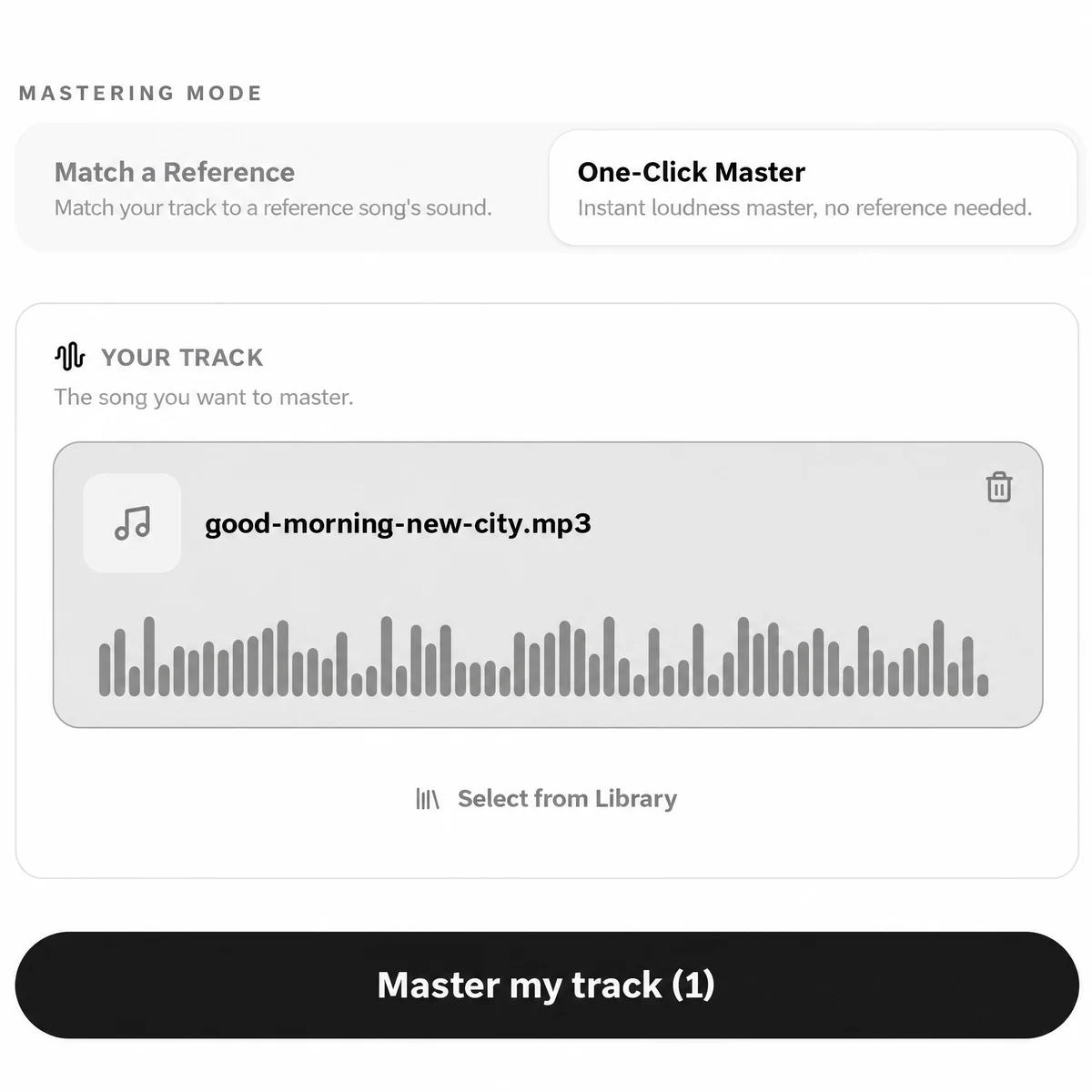
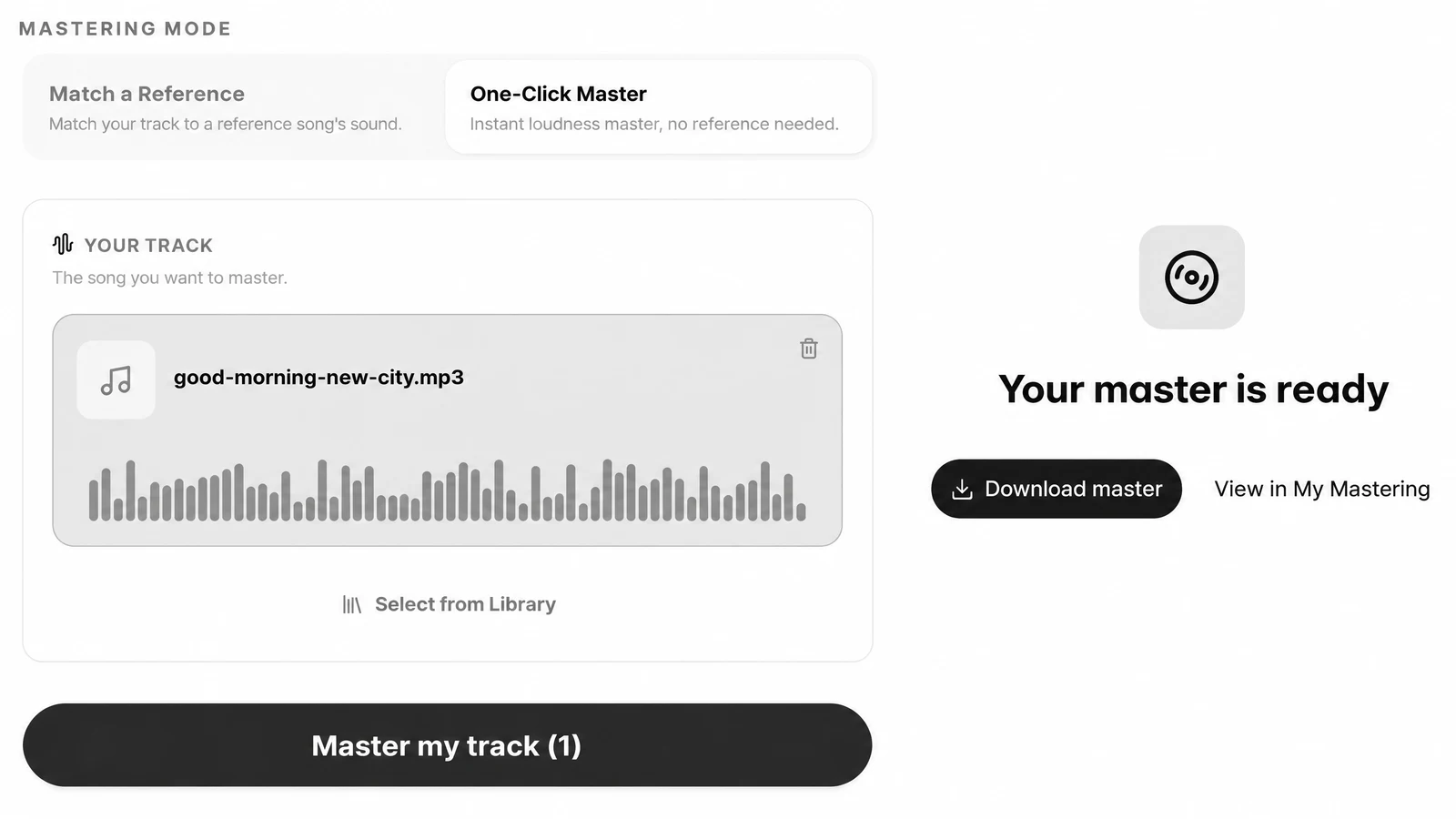
Drop your mix on the AI mastering page and it opens in the Studio as Your track. Pick One-Click Master for a streaming loudness target, or Match a Reference and add a mastered song in a similar style. Press Master my track, then download the WAV and listen next to your reference.
| Where it runs | Online, in the SongDuet Studio after sign in. The audio is processed on a server. |
|---|---|
| Input | One stereo mix per run: MP3, WAV, FLAC, M4A or OGG, uploaded or picked from your library |
| One-Click Master | Brings the track to a streaming loudness target, no reference needed |
| Match a Reference | Matches loudness, EQ, peak level and stereo width to a mastered song you choose |
| Output | A WAV file named after the track, kept in My Mastering |
| Cost | Credits per run, shown on the Master my track button; refunded if the job fails |
- Not a plugin. There is no VST, AU or desktop app. It does not run inside your DAW.
- No manual controls. No EQ, compressor, limiter or width knobs, and no loudness target to pick.
- No A/B player yet. The Studio does not show a before and after player or a LUFS readout.
- WAV only. No MP3 copy comes with the master.
- One file per run. No stems, no multitrack sessions, no batch of songs at once.
- It masters, it does not fix. A bad mix balance, noise or clipping in the source stays in the master.
Have a finished mix and a song you want it to sound like?
Open AI mastering
How we chose
We picked well-known audio mastering software from each of the four kinds above, so the list covers editors, plugins, a DAW assistant and online services instead of eight versions of the same thing.
Every fact about another product comes from that product's own website, read in November 2026. We did not run test masters through them, and we did not print prices, because they change by country and by month. Where a site did not state something, the table says not stated.
SongDuet makes one of the tools on this list, its own online mastering service. Its row follows the same rule: only what the Studio does today, including what it does not do.
Audio mastering software questions
Which audio mastering software should I pick?
For full control over a whole record, a mastering editor like WaveLab Pro. For mastering inside your DAW with an assistant, iZotope Ozone. If you mix in Logic, its built-in Mastering Assistant is the shortest path. If you have no DAW, an online service such as LANDR, eMastered, BandLab Mastering or SongDuet takes a finished mix and returns a master.
Is there free audio mastering software?
BandLab offers free mastering with four presets. LANDR lets you preview masters for free and charges to download. Ozone, Pro-L 2, WaveLab and Logic Pro offer trials before you pay. SongDuet mastering is not free: each run costs credits, and new accounts may start with welcome credits when they are on offer.
Is AI mastering as good as a plugin chain?
They answer different needs. A plugin chain gives you every control and needs a trained ear. Online AI mastering trades that control for speed and a result you can judge by listening. With SongDuet, Match a Reference works best when the reference is a mastered song in a style close to yours.
Can I master to sound like a reference song?
Yes, several tools here do it: Ozone’s Master Assistant can match a reference file, LANDR and eMastered accept a reference track, and SongDuet’s Match a Reference matches loudness, EQ, peak level and stereo width to the song you choose.
Is SongDuet mastering a plugin I can use in my DAW?
No. It runs online in the SongDuet Studio. You upload a finished stereo mix or pick a song from your library, and download the master as a WAV to bring back into your DAW.
Why are there no prices in the table?
Prices change often and differ by country, so we list the price model each product states: free, free previews, trial, subscription or one-time purchase. Check the product’s own pricing page before you buy.