Chord Finder
Pick a root and a chord type to see the fingering, step through the voicings up the neck and press Play to hear it. Piano and ukulele work the same way, and reverse mode names a chord from its notes. All of it costs nothing and runs on the page.
Root
Type
No diagram available for this chord.
Use the chord finder in four taps
The controls from top to bottom, in the order you use them.
1.Leave it on Find a chord and Guitar
The finder opens in Find a chord mode with Guitar selected. Piano and Ukulele sit beside it if you play those instead; the chord list is the same for all three.
2.Tap the root, then the type
Root is the row of twelve notes from C to B. Type holds fifteen chord types, from plain major (maj) and minor (m) to sevenths, sus chords, diminished and augmented. The chord name and its notes appear as soon as both are set.
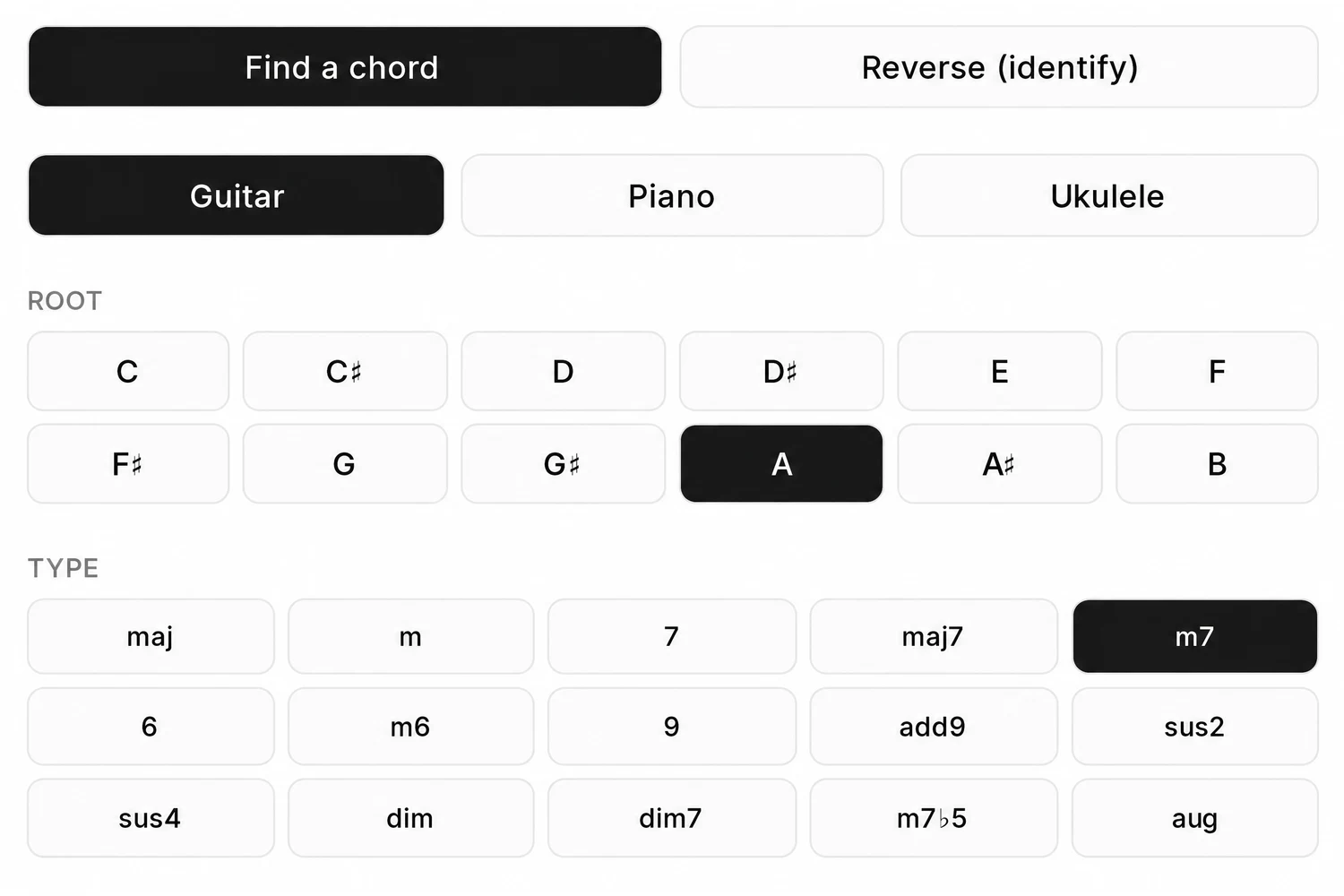
3.Read the diagram and press Play chord
The fretboard shows where each finger goes, with the finger number inside the dot. Press Play chord to hear the shape before you try it, so you know what it should sound like.
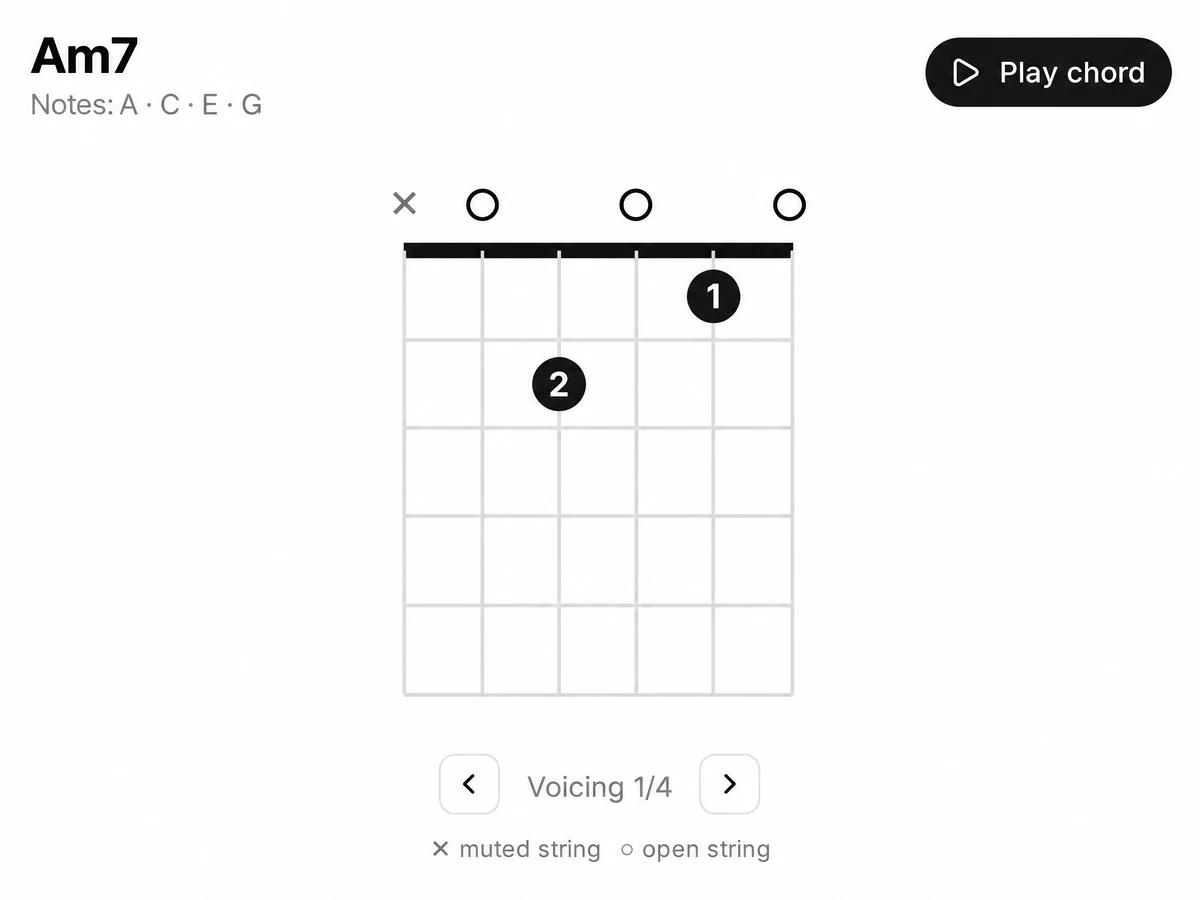
4.Step through the voicings
Under the diagram, the arrows move to the next shape for the same chord, further up the neck. The counter tells you which one you are on, for example Voicing 2/4. Pick the one that sits closest to the chords around it in your song.
Reading a chord diagram in the chord finder
Every mark on the fretboard, so a new shape makes sense the first time.
- Vertical lines
- The strings. On guitar the low E string is on the left, the high E on the right; ukulele shows four strings.
- Thick line at the top
- The nut. When the shape starts higher up the neck, the top line is thin and a number on the left gives the fret it starts from.
- Filled dot with a number
- Press here. The number is the finger: 1 index, 2 middle, 3 ring, 4 little finger.
- Long bar across strings
- A barre: one finger lies flat across several strings on that fret.
- Open circle above a string
- Play the string open, without pressing it.
- Cross above a string
- Do not play this string. Mute it or skip it with your strumming hand.
The 15 chord types, spelled on C
Each type is available on all twelve roots. The notes below are spelled the way a chord chart writes them on C; the chord finder names black keys with sharps, so E♭ shows there as D♯. Move the root and the pattern moves with it.
| Type | Symbol | Notes on C |
|---|---|---|
| Major | C | C E G |
| Minor | Cm | C E♭ G |
| Dominant 7th | C7 | C E G B♭ |
| Major 7th | Cmaj7 | C E G B |
| Minor 7th | Cm7 | C E♭ G B♭ |
| Sixth | C6 | C E G A |
| Minor 6th | Cm6 | C E♭ G A |
| Ninth | C9 | C E G B♭, plus D as the 9th |
| Added 9th | Cadd9 | C E G, plus D as the 9th |
| Suspended 2nd | Csus2 | C D G |
| Suspended 4th | Csus4 | C F G |
| Diminished | Cdim | C E♭ G♭ |
| Diminished 7th | Cdim7 | C E♭ G♭ B♭♭ (sounds as A) |
| Half-diminished | Cm7♭5 | C E♭ G♭ B♭ |
| Augmented | Caug | C E G♯ |
Reverse chord finder: tap the notes, get the name
Reverse (identify) works the other way round: you give it notes, it gives you chord names.
Found a shape by ear and want its name?
Switch to Reverse (identify) and tap the notes on the one octave keyboard. With two or more notes in, Matches lists every chord among the fifteen types that has exactly those notes. Tap C, E and G and it says C. Add A and it says C6 and Am7, because both chords use those four notes. Play chord sounds what you tapped, and Clear starts again.
Not sure which chords belong together? The song key finder names the key of a recording, and our guide to finding the key from the chords works it out from a chord list.

Piano and ukulele chords on the same page
Switch the instrument and the chord you picked stays selected.
Piano lights the chord across two octaves of keys. The root has its own shade so you can see where the chord starts, and the other chord tones are lit around it. Play chord voices it around middle C.
Ukulele gets its own fingering diagrams for four strings, with several voicings for most chords, read the same way as the guitar diagram above.
The chord finder keeps one chord list for every instrument: fifteen types on twelve roots, the same names and the same notes. That makes it easy to check what a guitarist and a pianist should each play for one chord symbol.
Hoping to pull chords out of a recording?
Many people who search for a chord finder want a recording turned into chord names. That is a different tool, and it is not this page.
What it is. A lookup for chords you name: shapes on guitar and ukulele, keys on piano, and names for notes you tap. It works without any audio.
What it is not. A chord detector. It does not listen to a song, a file or your microphone. For that, the SongDuet Studio has a Chords tab in its Notation stage, when it is switched on: it writes a chord chart with times from a song you upload, and it needs an account and uses credits.
To write a whole part out as notes instead, turn a recording into a score: the staves download as MusicXML and MIDI, with a Guitar Pro file for guitar and bass.
What this chord finder does not do
- Audio is never analysed. There is no upload and no microphone. It shows chords you choose, or names chords from notes you tap.
- No song sheets. There are no tabs or chord charts for named songs here.
- Standard tuning only. Guitar diagrams assume standard EADGBE tuning, with nothing to set for other tunings.
- Fifteen chord types. Eleventh and thirteenth chords, 7sus4, power chords and slash chords are not in the list.
- Reverse mode works on notes. You tap note names on a keyboard, not frets on a guitar neck, and inversions get their root position name.
- No bass guitar shapes. The three instruments are guitar, ukulele and piano. Diagrams are drawn for right handed players.
Chord finder questions
Does the chord finder cost anything?
No. Every chord, every voicing and the reverse mode are free to use, with no account and nothing to install.
Can it work out the chords of a song I upload?
Not on this page. It has no upload and no microphone. Chord charts from a recording are a separate job in the SongDuet Studio, which needs an account and credits.
Why are there several shapes for one chord?
The same notes can be played in different places on the neck. The open shape near the nut is usually the easiest; the higher voicings help when the next chord in the song is up the neck too.
How do I name a chord I am holding on the guitar?
Switch to Reverse (identify), work out which notes your shape plays, and tap them on the keyboard. Every matching chord name appears under Matches.
Why do I get two names for the same notes?
Some note sets really are two chords. C E G A is both C6 and Am7, and a diminished 7th like C E♭ G♭ A has a name for each of its four notes. The song around it decides which name fits.
Why do black keys show sharps and not flats?
The root buttons use sharp names: A♯ rather than B♭. They are the same pitch, so the shape is the one you are looking for.
Can I use it for ukulele and piano chords?
Yes. Pick Ukulele for four string fingering diagrams, or Piano to see the chord tones lit on two octaves of keys, the root marked apart.